Turn reusable templates into finished graphics.

Choose a template, customize text, images, graphics, and brand assets, then export a finished design.

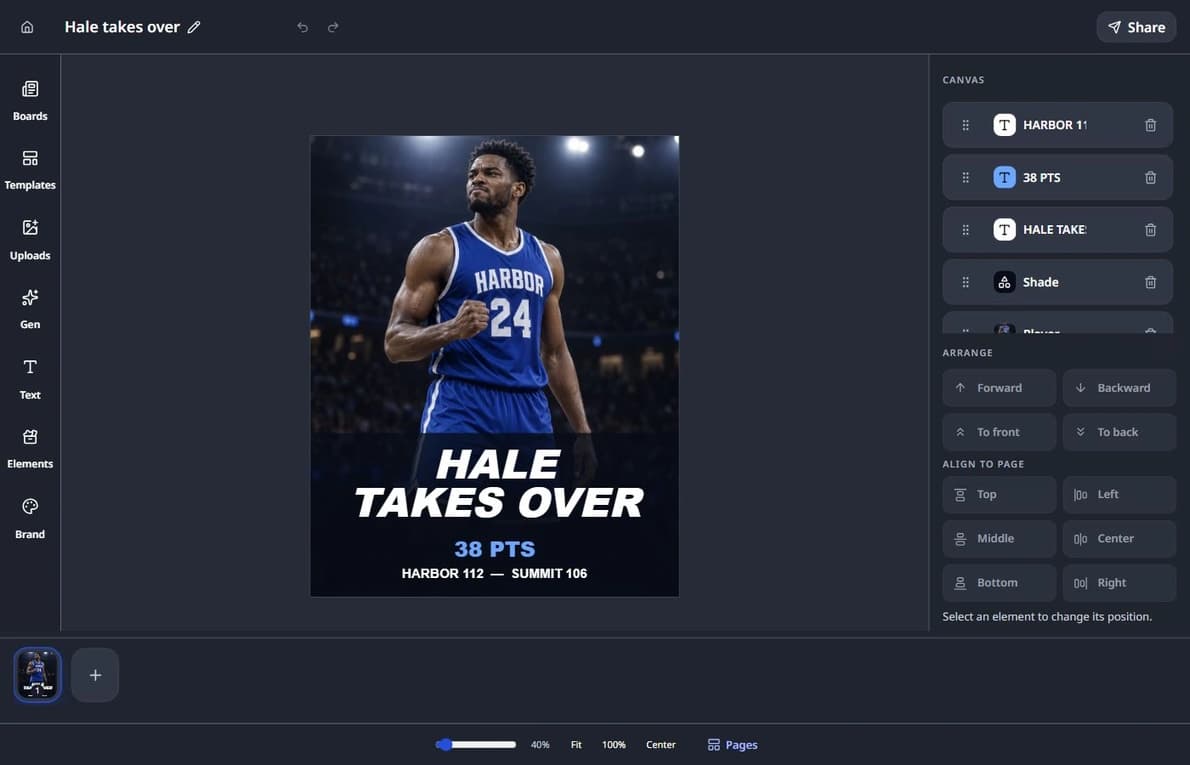
Semlens editor showing a blue Harbor jersey player graphic with Hale Takes Over, 38 PTS, and the Harbor 112–Summit 106 score.
Customize reusable templates with focused design controls.

From template to finished graphic

  1. Start with a reusable template

    Choose a ready-made layout that gives your next graphic a clear starting point.

  2. Customize the design

    Update text, images, graphics, and brand assets in a focused editing workspace.

  3. Export the finished graphic

    Review the completed design, then export it for the channel or workflow you choose.

What you can customize

Shape a reusable template around the story and brand you are working with.

  • Update text and source details.
  • Replace images and visual assets.
  • Add graphics and supporting elements.
  • Apply available brand logos, colors, and fonts.
  • Prepare the finished design for export.

Keep controls close to the canvas

Focused panels keep templates, graphics, frames, uploads, text, and brand assets near the design without turning the workspace into a generic design suite.

Preserve the reusable starting point

A published template provides the structure while each working design can be customized for the story at hand.

Review before export

Check the completed layout, content, and brand treatment before choosing a supported export option for the next publishing step.